Every system that writes to a database and publishes a message about what it just wrote has the same bug waiting to happen. In this article I will show you how to solve that problem in two ways. First option is done manually by hand, the other is using WolverineFX.
I will compare what you get for doing it manually and the full runnable source created as a result form this article is available on my GitHub.
The problem with dual writes
Let's have an example like placing an order in an e-commerce API. Two things need to happen. We have to save the order to the database, and then inform the rest of our system (shipping, billing, notification, etc) that an order was placed.
The obvious way to do it would be:
await db.SaveChangesAsync();               // 1. write to Postgres
await bus.PublishAsync(new OrderPlaced(...)); // 2. write to the broker
As you can see we have two different writes at two independent systems. The problem is that we got no option for them to succeed or fail together. Every ordering has a failure mode as shown in the image below.
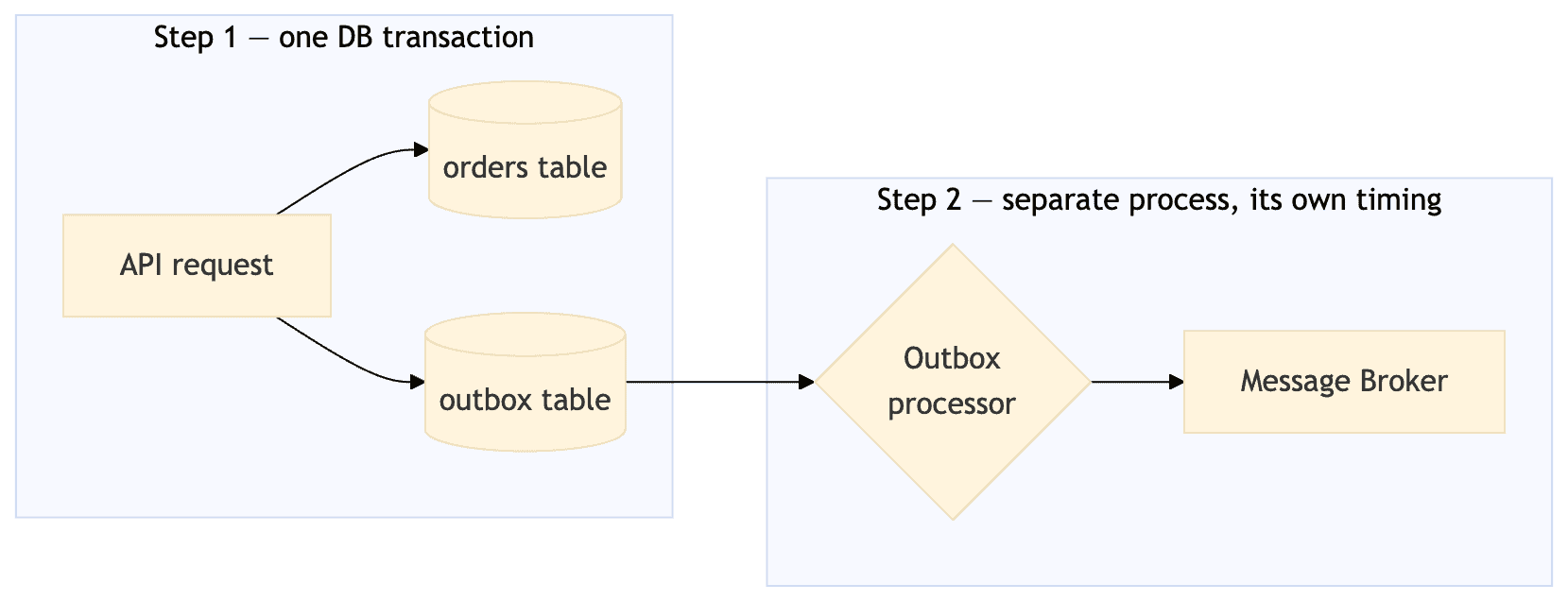
If you flip the order, you would get the opposite failure 😅 The broker receives the message, and the downstream services will kick off to fulfill the order, but then the database write rolls back, the broker is not informed... The order does not exist in the database. Now we are shipping an order that does not exist.
If you wrap both calls in a try/catch i won't help you either. There is no operation that atomically spans a database and a message broker. They are separate systems, and have no shared transaction coordinator.
The pattern in general
With the outbox pattern will sidestep the problem by never writing to two systems in one go. Instead this will happen:
- When you are saving the order, you will also save a row describing the event, in the same database transaction. With Postgres you get the atomicity for free out of the box. Either both rows exist or none of them does.
- A separate process will read the unpublished rows from the table and forward them to the broker. When that happens, it will mark each of them as processed once they succeed.
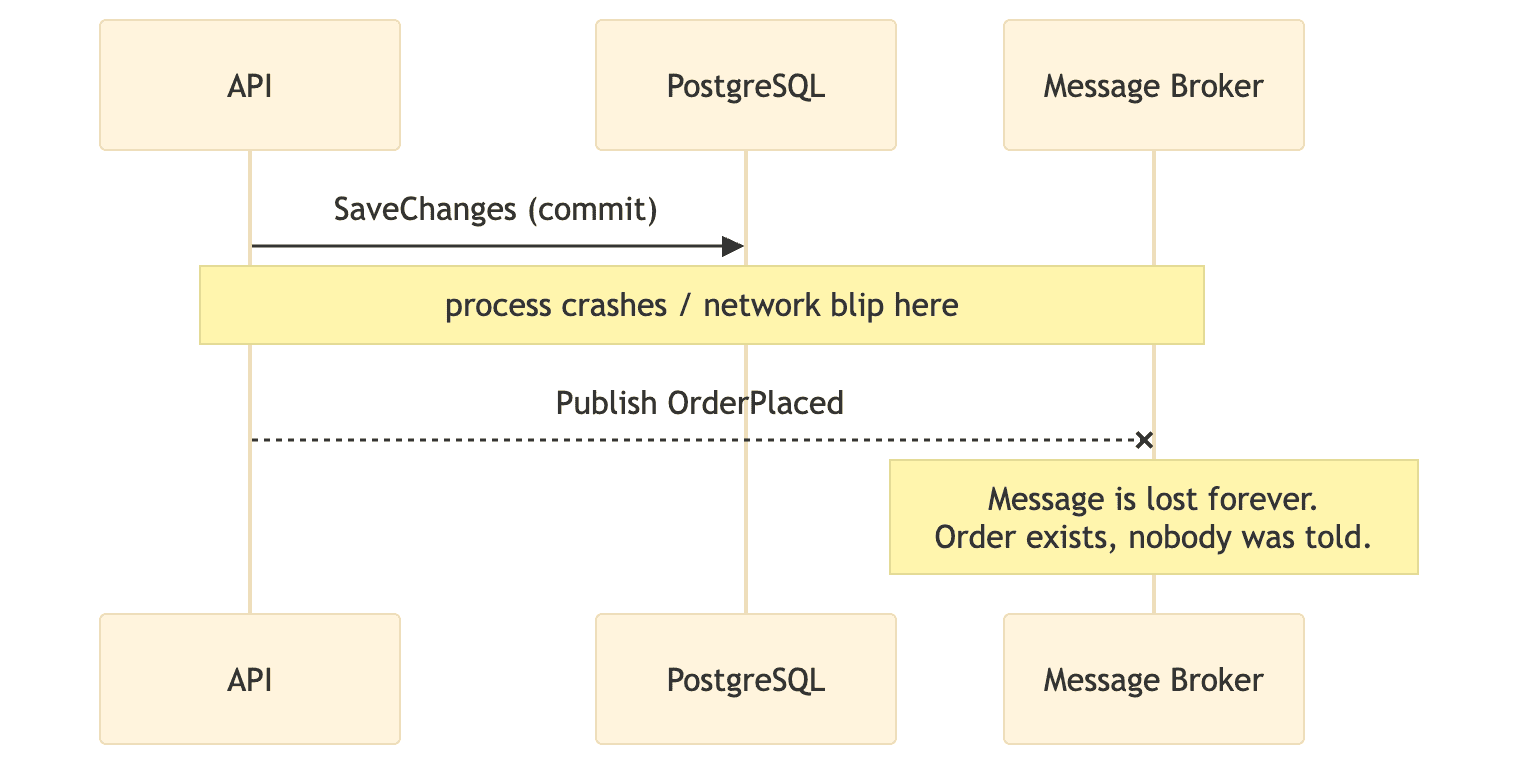
This makes our broker move outside of the transaction. The benefit is that it can be retried independently, as many times as you need it, and there is no option for risking the order record itself.
By doing this you accept that your message delivery becomes at-least-once, and there will be a small window of eventual consistency between when order is saved and the message is delivered.
When implementing a service invoked by the broker (downstream), you have to ask and answer the same handful of design questions. I have listed them below, please let me know in the comments if you got any additions.
- How does the processor find unpublished rows without missing any or double-processing?
- What happens when publishing fails?
- What happens when you scale the processor to more than one instance?
- How does a downstream consumer cope with the same message arriving twice (because at-least-once delivery will eventually deliver twice)?
Okay, enough theory - let's write some code and implement it.
Building it from scratch
Design
Storage
A single outbox_messages table living in the same Postgres database as the business tables, with the following schema.
| Column | Purpose |
|---|---|
id |
Message identity |
type |
CLR/event type name, used for routing on publish |
payload |
Serialized JSON |
occurred_at_utc |
For ordering |
processed_at_utc |
NULL = still pending; this is the column the processor filters on |
attempts / last_error |
Retry bookkeeping and a crude dead-letter signal |
Writing
POST /orders adds both an Order and an OutboxMessage to the same DbContext and calls SaveChangesAsync() once. EF Core wraps that in one transaction automatically. There is no explicit BeginTransaction needed for a single SaveChanges call.
Reading and publishing
A BackgroundService polls every 2 seconds. This is the part worth slowing down on! Why? The naive version of this loop is broken the moment you run more than one instance of the service - which you eventually will, for availability if nothing else. 🤷♂️
Can you image it? I can - here is how I would design it 🧑🎨
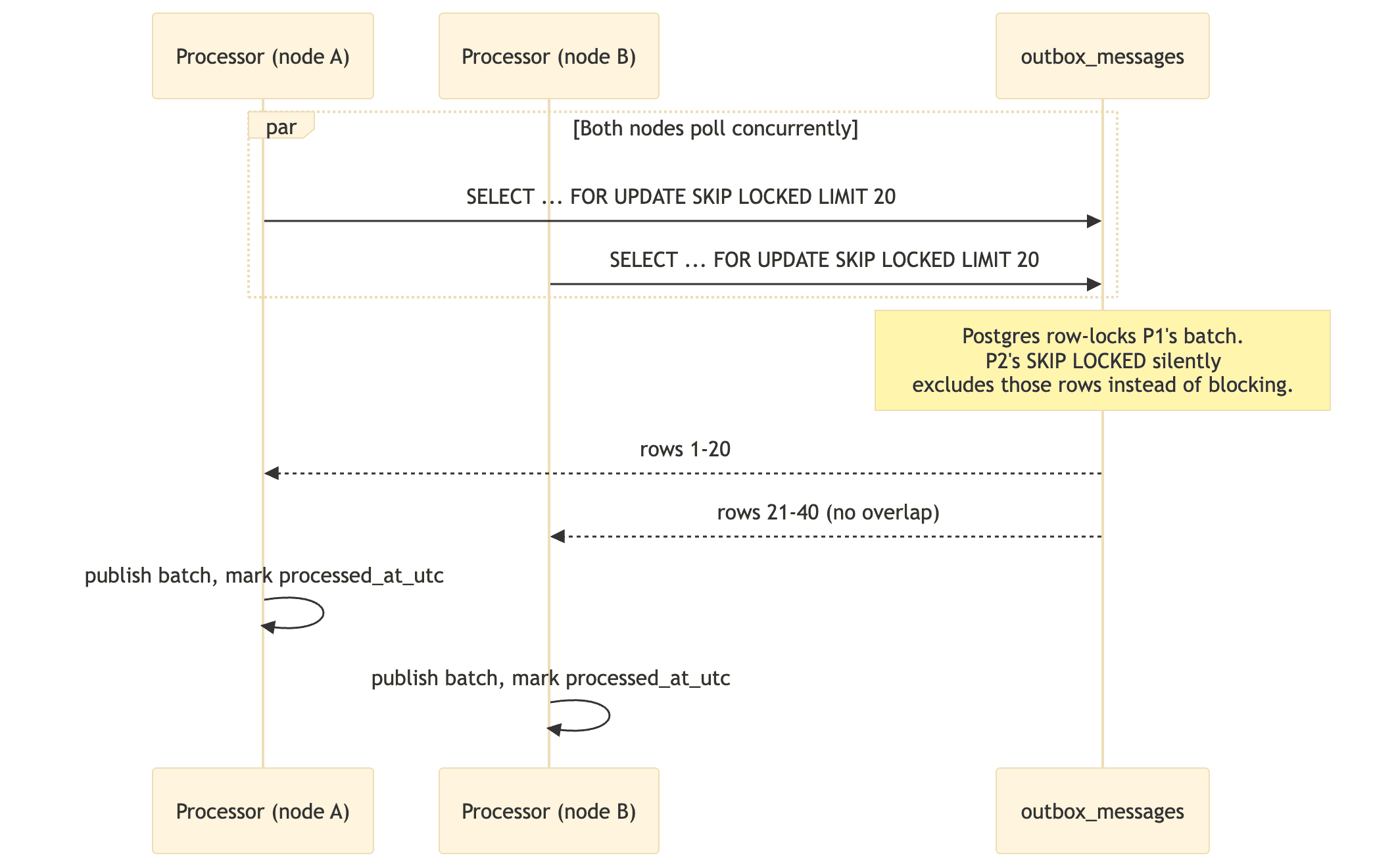
SELECT ... FOR UPDATE SKIP LOCKED is doing all the work here, can you see why? It lets any number of processor instances poll the same table concurrently without either blocking each other or racing to publish the same row twice. Without it, you'd need to either run exactly one processor instance (a single point of failure) or build your own distributed locking on top. And who on earth would do that, if they can avoid it? 😅
Failure handling
If publishing throws, the row's processed_at_utc is left NULL and attempts is incremented — it gets picked up again on the next poll. Rows are excluded once attempts crosses a threshold, which is a crude but effective way to stop hammering a broker for a message that will never succeed (a real system would move these to a proper dead-letter table instead of just ignoring them).
Consumer idempotency
Because a crash can happen after a successful publish but before processed_at_utc is written, the same message can be sent twice, which is fully legitimate. This is not a bug to fix 🐛 it's an inherent property of at-least-once delivery, and it means whatever reads these messages downstream has to be idempotent (e.g., dedupe on the message id).
The code
The whole thing is a handful of files. Starting with the shared domain both projects use for sake of ease, is defined this way.
namespace Outbox.Shared;

/// <summary>
///     Minimal Order aggregate. Deliberately thin - the point of this repo is the
///     outbox mechanics around it, not a rich domain model.
/// </summary>
public class Order
{
    public Guid Id { get; private set; }
    public string CustomerEmail { get; private set; } = default!;
    public decimal TotalAmount { get; private set; }
    public DateTimeOffset PlacedAtUtc { get; private set; }

    private Order() { } // EF Core

    public static Order Place(string customerEmail, decimal totalAmount)
    {
        if (string.IsNullOrWhiteSpace(customerEmail))
            throw new ArgumentException("Customer email is required.", nameof(customerEmail));
        if (totalAmount <= 0)
            throw new ArgumentOutOfRangeException(nameof(totalAmount), "Order total must be positive.");

        return new Order
        {
            Id = Guid.NewGuid(),
            CustomerEmail = customerEmail,
            TotalAmount = totalAmount,
            PlacedAtUtc = DateTimeOffset.UtcNow
        };
    }
}

/// <summary>
///     The integration event we want other systems to find out about, reliably,
///     exactly because "Order" was saved to the database.
/// </summary>
public record OrderPlaced(Guid OrderId, string CustomerEmail, decimal TotalAmount, DateTimeOffset PlacedAtUtc);
I have abstracted the transport of the event behind an interface. The sample you can find on my GitHub will ship with a LoggingTransportPublisher. This will make it run nothing but Postgres, but the processor code has zero knowledge of e.g. RabbitMQ, Azure Service Bus, or Kafka making it a generic solution where you can plug and play a message broker of your choice. One of the reasons I love dependency injection - you can swap the registration and our polling loop behind won't change. What's not to like here?! 👏
Here is the interface, also in the shared project.
namespace Outbox.Shared;

/// <summary>
///     Deliberately generic seam between "we decided a message needs to leave this process"
///     and "how it actually leaves this process" (RabbitMQ, Azure Service Bus, Kafka, ...).
///
///     The outbox pattern itself doesn't care which transport you use - that's the whole
///     point of the pattern. Swap the implementation registered in DI and nothing else
///     in the outbox processor changes.
/// </summary>
public interface ITransportPublisher
{
    Task PublishAsync(string messageType, string payloadJson, CancellationToken cancellationToken);
}
What does this make the outbox entity? Just a single row describing an event and whether is has been published yet.
Here is the entity definition of the outbox event.
namespace Outbox.FromScratch.Data;

/// <summary>
///     A row in the outbox table. Written in the SAME database transaction as the
///     business data it describes - that's the entire trick behind the pattern.
///     A separate process later reads unprocessed rows and forwards them to a transport.
/// </summary>
public class OutboxMessage
{
    public Guid Id { get; set; }

    /// <summary>CLR type name of the event, used to deserialize/route on publish.</summary>
    public string Type { get; set; } = default!;

    /// <summary>Serialized event payload (JSON).</summary>
    public string Payload { get; set; } = default!;

    public DateTimeOffset OccurredAtUtc { get; set; }

    /// <summary>Null while unprocessed. Set once successfully handed to the transport.</summary>
    public DateTimeOffset? ProcessedAtUtc { get; set; }

    /// <summary>Bumped on every failed publish attempt; drives backoff and poison detection.</summary>
    public int Attempts { get; set; }

    public string? LastError { get; set; }
}
The DbContext mapping both Order and OutboxMessage to tables, with a partial index on processed_at_utc since the processor is constantly scanning for NULL rows, is implemented the following way.
using Microsoft.EntityFrameworkCore;
using Outbox.Shared;

namespace Outbox.FromScratch.Data;

public class AppDbContext(DbContextOptions<AppDbContext> options) : DbContext(options)
{
    public DbSet<Order> Orders => Set<Order>();
    public DbSet<OutboxMessage> OutboxMessages => Set<OutboxMessage>();

    protected override void OnModelCreating(ModelBuilder modelBuilder)
    {
        modelBuilder.Entity<Order>(b =>
        {
            b.ToTable("orders");
            b.HasKey(o => o.Id);
            b.Property(o => o.CustomerEmail).HasMaxLength(320).IsRequired();
            b.Property(o => o.TotalAmount).HasColumnType("numeric(18,2)");
        });

        modelBuilder.Entity<OutboxMessage>(b =>
        {
            b.ToTable("outbox_messages");
            b.HasKey(m => m.Id);
            b.Property(m => m.Type).HasMaxLength(500).IsRequired();
            b.Property(m => m.Payload).HasColumnType("jsonb").IsRequired();

            // The processor scans for unprocessed rows constantly - index it.
            b.HasIndex(m => m.ProcessedAtUtc)
                .HasDatabaseName("ix_outbox_messages_unprocessed")
                .HasFilter("processed_at_utc IS NULL");
        });
    }
}
The stand-in transport for demo purpose. You should swap this registration for a real broker client and nothing else changes. 🙌
using Outbox.Shared;

namespace Outbox.FromScratch;

/// <summary>
///     Stand-in transport so the sample runs with zero infrastructure beyond Postgres.
///     Swap this registration for a real implementation (RabbitMqTransportPublisher,
///     ServiceBusTransportPublisher, KafkaTransportPublisher, ...) - the OutboxProcessor
///     never needs to know or care which one is active.
/// </summary>
public class LoggingTransportPublisher(ILogger<LoggingTransportPublisher> logger) : ITransportPublisher
{
    public Task PublishAsync(string messageType, string payloadJson, CancellationToken cancellationToken)
    {
        // A real implementation would, e.g.:
        //   await _rabbitChannel.BasicPublishAsync(exchange, routingKey: messageType, body: ..., cancellationToken);
        // or
        //   await _serviceBusSender.SendMessageAsync(new ServiceBusMessage(payloadJson) { Subject = messageType }, cancellationToken);
        logger.LogInformation("Published {MessageType}: {Payload}", messageType, payloadJson);
        return Task.CompletedTask;
    }
}
And the polling loop itself. This is the heart of the system lifting the real work of this whole approach.
using Microsoft.EntityFrameworkCore;
using Outbox.FromScratch.Data;
using Outbox.Shared;

namespace Outbox.FromScratch;

/// <summary>
///     Polls the outbox table for unprocessed rows and forwards them to the transport.
///
///     The interesting bit is <c>FOR UPDATE SKIP LOCKED</c>: if you ever run more than one
///     instance of this service (which you will, the moment you scale out horizontally),
///     every instance can poll the same table concurrently without stepping on each other -
///     Postgres simply skips rows another connection already has locked instead of blocking.
///     Without this, two instances would race to publish the same message twice, or block
///     each other and tank throughput.
/// </summary>
public class OutboxProcessor(
    IServiceScopeFactory scopeFactory,
    ILogger<OutboxProcessor> logger) : BackgroundService
{
    private static readonly TimeSpan PollInterval = TimeSpan.FromSeconds(2);
    private const int BatchSize = 20;
    private const int MaxAttempts = 5;

    protected override async Task ExecuteAsync(CancellationToken stoppingToken)
    {
        while (!stoppingToken.IsCancellationRequested)
        {
            try
            {
                await ProcessBatchAsync(stoppingToken);
            }
            catch (Exception ex)
            {
                // A failure here means the poll itself blew up (e.g. DB unreachable) -
                // not an individual message failure, which is handled per-row below.
                logger.LogError(ex, "Outbox poll failed");
            }

            await Task.Delay(PollInterval, stoppingToken);
        }
    }

    private async Task ProcessBatchAsync(CancellationToken cancellationToken)
    {
        using var scope = scopeFactory.CreateScope();
        var db = scope.ServiceProvider.GetRequiredService<AppDbContext>();
        var publisher = scope.ServiceProvider.GetRequiredService<ITransportPublisher>();

        await using var transaction = await db.Database.BeginTransactionAsync(cancellationToken);

        // Raw SQL because EF Core's LINQ provider has no way to express SKIP LOCKED.
        var batch = await db.OutboxMessages
            .FromSqlInterpolated($"""
                SELECT * FROM outbox_messages
                WHERE processed_at_utc IS NULL AND attempts < {MaxAttempts}
                ORDER BY occurred_at_utc
                LIMIT {BatchSize}
                FOR UPDATE SKIP LOCKED
                """)
            .ToListAsync(cancellationToken);

        if (batch.Count == 0)
        {
            await transaction.CommitAsync(cancellationToken);
            return;
        }

        foreach (var message in batch)
        {
            try
            {
                await publisher.PublishAsync(message.Type, message.Payload, cancellationToken);
                message.ProcessedAtUtc = DateTimeOffset.UtcNow;
            }
            catch (Exception ex)
            {
                // Leave ProcessedAtUtc null so it's picked up again next poll.
                // At-least-once delivery: consumers on the other end MUST be idempotent,
                // because a message can be published successfully but the process can
                // crash before we record that fact here - it would be retried too.
                message.Attempts++;
                message.LastError = ex.Message;
                logger.LogWarning(ex, "Failed to publish outbox message {MessageId} (attempt {Attempt})",
                    message.Id, message.Attempts);
            }
        }

        await db.SaveChangesAsync(cancellationToken);
        await transaction.CommitAsync(cancellationToken);

        logger.LogInformation("Outbox batch processed: {Count} messages", batch.Count);
    }
}
Finally, the endpoint that ties it together. There is only one SaveChangesAsync() call writing both the Order and the OutboxMessage in a single transaction. 🎉
using Microsoft.EntityFrameworkCore;
using Outbox.FromScratch;
using Outbox.FromScratch.Data;
using Outbox.Shared;
using System.Text.Json;

var builder = WebApplication.CreateBuilder(args);

builder.Services.AddDbContext<AppDbContext>(options =>
    options.UseNpgsql(builder.Configuration.GetConnectionString("Postgres")));

// Swap this one registration for a real transport - nothing else in the app changes.
builder.Services.AddSingleton<ITransportPublisher, LoggingTransportPublisher>();

builder.Services.AddHostedService<OutboxProcessor>();

var app = builder.Build();

app.MapPost("/orders", async (PlaceOrderRequest request, AppDbContext db, CancellationToken ct) =>
{
    var order = Order.Place(request.CustomerEmail, request.TotalAmount);
    var @event = new OrderPlaced(order.Id, order.CustomerEmail, order.TotalAmount, order.PlacedAtUtc);

    // This is the entire pattern: the business row and the outbox row are written
    // in ONE SaveChangesAsync call, which EF Core wraps in a single database
    // transaction. Either both are committed, or neither is. There is no window
    // where the order exists but the event was silently dropped, and no window
    // where the event fires but the order never actually got saved.
    db.Orders.Add(order);
    db.OutboxMessages.Add(new OutboxMessage
    {
        Id = Guid.NewGuid(),
        Type = nameof(OrderPlaced),
        Payload = JsonSerializer.Serialize(@event),
        OccurredAtUtc = DateTimeOffset.UtcNow
    });

    await db.SaveChangesAsync(ct);

    return Results.Created($"/orders/{order.Id}", new { order.Id });
});

app.MapGet("/orders/{id:guid}", async (Guid id, AppDbContext db, CancellationToken ct) =>
{
    var order = await db.Orders.FindAsync([id], ct);
    return order is null ? Results.NotFound() : Results.Ok(order);
});

app.Run();

internal record PlaceOrderRequest(string CustomerEmail, decimal TotalAmount);
That is all it takes to roll your own transactional outbox in .NET. When I made this I wrote down pros and cons of rolling it myself vs using a pre-built solution. I have tried to sum them up below.
Pros
- Zero framework dependency. Nothing else is needed than EF Core + Npgsql. No new concepts for your team to learn, no library version to track.
- Full visibility. You own every line. When it breaks at 3am, there's no framework internals to reverse-engineer.
- Total control over the storage shape, retry policy, batching, and dead-letter behavior.
Cons
- You own every edge case. 😰 Poison messages, backoff, monitoring, exactly-what-counts-as-a-crash-mid-publish. All things a mature library has already hardened over years of production use.
- No inbox support. 👎 This solves outgoing messages only. If your consumers also need deduplication support, that's another table and another piece of infrastructure to build.
- No routing, serialization conventions, tracing, or multi-transport story. All of that is now application code to write and maintain, and you are the only one to do it.
- Polling latency. Messages sit for up to
PollIntervalbefore going out. Fine for most business events. I have designed and built systems, where requirements like that would not be fine as sub-second delivery was needed. That would push you towardLISTEN/NOTIFYor change-data-capture.
What else did I consider
- Two-phase commit (2PC/XA). This technically solves the atomicity problem for us directly, but almost no modern message broker supports being a participant in a distributed transaction 😅, and even where it's technically possible, 2PC is notorious for holding locks across a network round-trip and turning a slow broker into a system-wide outage. Not seriously considered though. 😂
- Postgres
LISTEN/NOTIFYinstead of polling. I mentioned this as the option we would pushed towards. It would cut latency to near-zero by having Postgres push a notification the moment a row is inserted, instead of the processor polling on a timer. Rejected for the from-scratch version to keep the sample simple, but it's a legitimate upgrade, and worth it once fixed-interval polling latency actually matters. - Change Data Capture (Debezium + Kafka Connect). Reads the Postgres WAL (Write-Ahead Logging is a standard method for ensuring data integrity) directly and streams every row change out. You have no polling table or application code involved at all. Extremely robust and used at real scale, but it's a meaningfully heavier piece of infrastructure to run and operate (Kafka + Kafka Connect + Debezium) for what a 30-line background service handles for a small-to-mid-size system. Worth it once you're already running Kafka for other reasons.
- Publish-then-write instead of write-then-publish. Sent to the trash immidiately. Why? It reopens exactly the failure mode the pattern exists to close 😅 (see my diagram above).
Building it with WolverineFX
WolverineFX treats the transactional outbox as a first-class, built-in feature rather than something you assemble. It uses the same Postgres tables/locking mechanics under the hood as what we just wrote by hand, but you never touch them. 👌
 Jeremy D. Miller
Design
Storage
Wolverine manages its own envelope tables in Postgres (wolverine_outgoing_envelopes and friends), created and migrated automatically. You don't define an outbox entity or write migrations for it.
Writing
Instead of hand-rolling an OutboxMessage row, you get an IDbContextOutbox<T> injected into the endpoint. You add your entity to the DbContext as per normal procedure, call PublishAsync on the outbox, and one call SaveChangesAndFlushMessagesAsync() that will commit the business row and the outbox row in a single transaction and hands the message off, sounds easy and cool right?
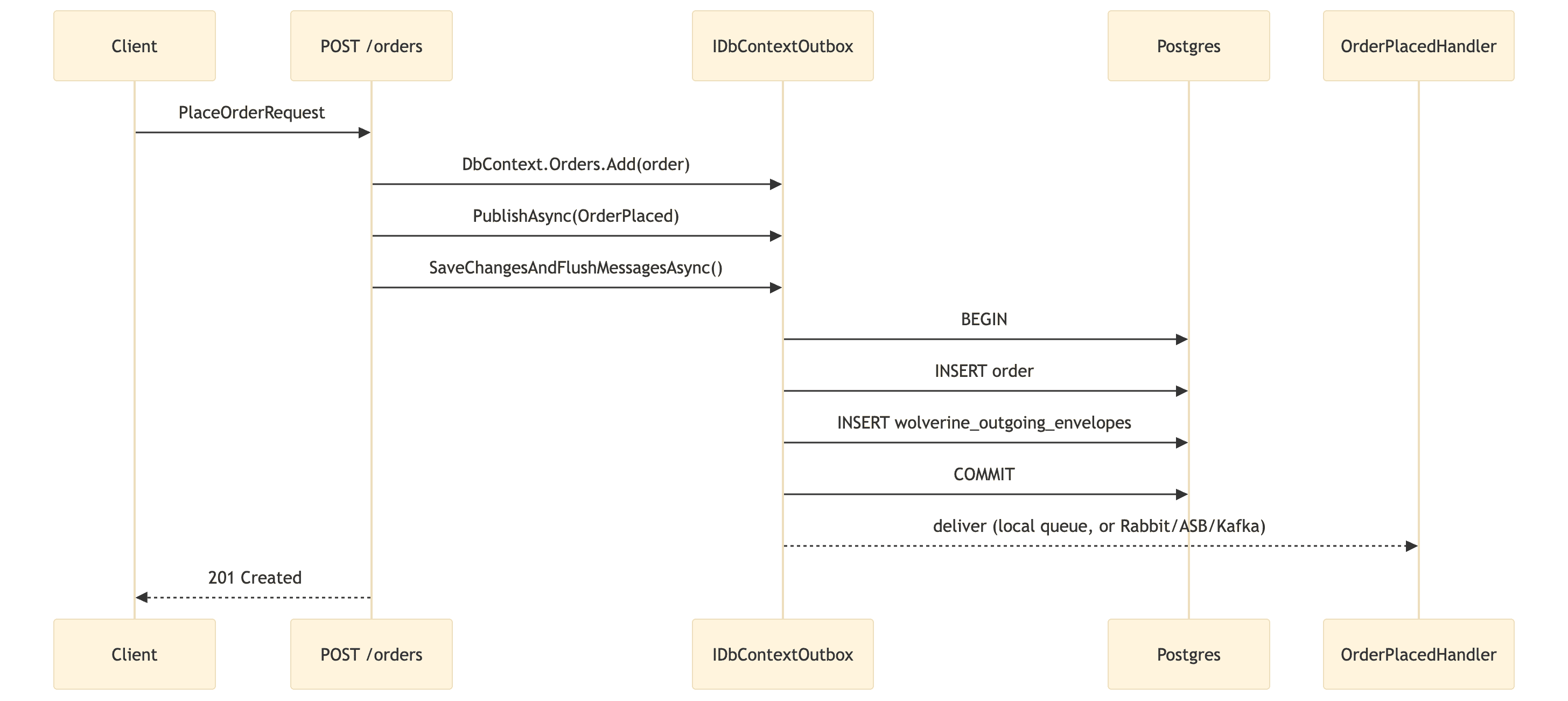
Reading and publishing
There is no polling loop to write. Wolverine's durability agent owns recovering and dispatching persisted envelopes, including the "another node died mid-send, someone needs to pick this up" recovery case that our hand-rolled FOR UPDATE SKIP LOCKED loop was specifically built to handle. It's the same underlying mechanism, Wolverine just already built it.
Transport
My sample uses Wolverine's durable local queues. opts.Policies.UseDurableLocalQueues() which makes my OrderPlacedHandler run in-process, but with the same crash-safety as an external broker. This means that if the app dies between commit and handling, the message is recovered and re-delivered on restart, it isn't lost. Swapping to a real broker is a configuration change, not a rewrite. Please check out my commented-out RabbitMQ/Azure Service Bus/Kafka blocks in Program.cs. Nothing in the endpoint or the handler changes.
Consuming
OrderPlacedHandler.Handle(OrderPlaced, ILogger). Wolverine finds and wires it up purely by naming convention. No interface, no manual registration. Wooha! 👏
The code
Same Order and OrderPlaced from Outbox.Shared as in the hand rolles version. We can now get rid of the OutboxMessage entity, the migration for it, the OutboxProcessor background service, and the manual FOR UPDATE SKIP LOCKED SQL. So what is left?
A plain DbContext, and no outbox entity, no envelope mapping to write by hand - yes please!
using Microsoft.EntityFrameworkCore;
using Outbox.Shared;

namespace Outbox.Wolverine.Data;

/// <summary>
///     Plain EF Core DbContext - no outbox table, no OutboxMessage entity, no manual
///     envelope mapping. Registering it through AddDbContextWithWolverineIntegration
///     (see Program.cs) quietly adds Wolverine's own envelope storage mapping for us.
/// </summary>
public class OrdersDbContext(DbContextOptions<OrdersDbContext> options) : DbContext(options)
{
    public DbSet<Order> Orders => Set<Order>();

    protected override void OnModelCreating(ModelBuilder modelBuilder)
    {
        modelBuilder.Entity<Order>(b =>
        {
            b.ToTable("orders");
            b.HasKey(o => o.Id);
            b.Property(o => o.CustomerEmail).HasMaxLength(320).IsRequired();
            b.Property(o => o.TotalAmount).HasColumnType("numeric(18,2)");
        });
    }
}
My consumer is found and wired up by Wolverine purely by naming convention, no registration required - I am in love! ❤️
using Outbox.Shared;

namespace Outbox.Wolverine.Handlers;

/// <summary>
///     Wolverine finds this by naming convention alone (class ends in "Handler", method
///     is named "Handle"/"HandleAsync") - no registration, no interface to implement.
///
///     With the default local queue routing used in this sample, this runs in-process on
///     a background thread right after the HTTP request that placed the order returns.
///     Point Wolverine at Rabbit/Azure Service Bus/Kafka instead (see Program.cs) and this
///     same method could just as easily be running in a completely separate service -
///     the handler code does not change either way.
/// </summary>
public static class OrderPlacedHandler
{
    public static void Handle(OrderPlaced @event, ILogger<OrderPlaced> logger)
    {
        logger.LogInformation(
            "Order {OrderId} placed by {Email} for {Amount:C}",
            @event.OrderId, @event.CustomerEmail, @event.TotalAmount);
    }
}
And the wiring is also straight out of the box. Wolverine setup plus the same POST /orders endpoint shape as I did in the hand-rolled version, now backed by IDbContextOutbox<T> instead of a hand-rolled table.
using Microsoft.EntityFrameworkCore;
using Outbox.Shared;
using Outbox.Wolverine.Data;
using Wolverine;
using Wolverine.EntityFrameworkCore;
using Wolverine.Postgresql;

var builder = WebApplication.CreateBuilder(args);

var connectionString = builder.Configuration.GetConnectionString("Postgres")!;

builder.Host.UseWolverine(opts =>
{
    // Where Wolverine stores outgoing (outbox) and incoming (inbox) envelopes.
    // This is a handful of Wolverine-owned tables in the SAME Postgres database
    // as the application data - that's what lets the write and the outbox insert
    // share one transaction.
    opts.PersistMessagesWithPostgresql(connectionString);

    // Registers OrdersDbContext in DI (as Singleton DbContextOptions, which is a
    // deliberate Wolverine perf optimization), adds Wolverine's envelope-storage
    // mapping to it, and wires up EF Core transactional middleware + IDbContextOutbox.
    opts.Services.AddDbContextWithWolverineIntegration<OrdersDbContext>(
        x => x.UseNpgsql(connectionString));

    // Even messages that never leave this process get persisted until they're
    // handled, so a crash between "order saved" and "handler ran" still
    // self-heals on restart instead of silently losing the message.
    opts.Policies.UseDurableLocalQueues();

    // --- Swap in a real broker here. The endpoint and handler code below never
    //     change - only this configuration block does. ---
    //
    // RabbitMQ:
    //   opts.UseRabbitMq(rabbit => rabbit.HostName = "localhost").AutoProvision();
    //   opts.PublishMessage<OrderPlaced>().ToRabbitExchange("orders");
    //
    // Azure Service Bus:
    //   opts.UseAzureServiceBus(builder.Configuration.GetConnectionString("ServiceBus")!).AutoProvision();
    //   opts.PublishMessage<OrderPlaced>().ToAzureServiceBusQueue("orders");
    //
    // Kafka:
    //   opts.UseKafka(builder.Configuration["Kafka:BootstrapServers"]!);
    //   opts.PublishMessage<OrderPlaced>().ToKafkaTopic("orders");
});

var app = builder.Build();

app.MapPost("/orders", async (PlaceOrderRequest request, IDbContextOutbox<OrdersDbContext> outbox, CancellationToken ct) =>
{
    var order = Order.Place(request.CustomerEmail, request.TotalAmount);
    outbox.DbContext.Orders.Add(order);

    await outbox.PublishAsync(new OrderPlaced(order.Id, order.CustomerEmail, order.TotalAmount, order.PlacedAtUtc));

    // This one call is the entire pattern: it commits the Order row and the
    // outbox row for OrderPlaced in a single database transaction, then flushes
    // the message for delivery. It replaces the OutboxMessage table, the
    // BackgroundService, and the FOR UPDATE SKIP LOCKED polling loop from the
    // from-scratch version wholesale.
    await outbox.SaveChangesAndFlushMessagesAsync(ct);

    return Results.Created($"/orders/{order.Id}", new { order.Id });
});

app.MapGet("/orders/{id:guid}", async (Guid id, OrdersDbContext db, CancellationToken ct) =>
{
    var order = await db.Orders.FindAsync([id], ct);
    return order is null ? Results.NotFound() : Results.Ok(order);
});

app.Run();

internal record PlaceOrderRequest(string CustomerEmail, decimal TotalAmount);
Why WolverineFX specifically?
There are several credible messaging libraries in .NET with outbox support we can choose from like MassTransit, NServiceBus, Brighter — so "why Wolverine" deserves a real answer rather than just "it's newer", accoding to my opinions.
- The outbox is the default, not an add-on. In MassTransit, transactional outbox support (
AddEntityFrameworkOutbox) is something you explicitly configure per-context and per-endpoint. In Wolverine, onceUseEntityFrameworkCoreTransactions()/AddDbContextWithWolverineIntegrationis wired up, every handler or HTTP endpoint that touches yourDbContextgets transactional messaging by default. You have to opt out, not in. - It covers the mediator use case too. Wolverine works as an in-process mediator (à la MediatR) and as a full external message bus with the same handler code either way. That's one library instead of "MediatR for in-process, plus MassTransit/NServiceBus for the broker," which is a common combination it was explicitly built to replace.
- Local-queue durability for free. The "durable local queues" feature used in this sample, crash-safe in-process delivery, no broker required, isn't something you commonly get out of the box elsewhere. It makes an in-process outbox consumer genuinely production-viable on day one, before you've decided (or need) to stand up RabbitMQ/Kafka/ASB at all.
- Licensing. NServiceBus is commercial. MassTransit introduced a paid tier for parts of its platform in 2025. Wolverine (from the JasperFx/Marten) is fully open source under MIT. Licensing terms change, so verify current terms before treating this as a long-term decision driver, but at the time of writing it's a real point in Wolverine's favor for teams that don't want a commercial dependency baked into core infrastructure.
- Source-generated pipeline. Wolverine generates the message-handling code at build/startup time rather than resolving handlers through reflection on every message, which shows up as a real, measurable throughput/latency advantage over reflection-based competitors in independent benchmarks.
None of this makes Wolverine strictly better. MassTransit has a longer track record and a larger existing install base, which is its own kind of safety. But for a new .NET project specifically choosing an outbox-first messaging story, Wolverine's design center is closer to "outbox by default" than any of its main competitors'.
Pros
- Less code, and the code that remains is what actually differs from application to application (the domain, the endpoint) rather than plumbing.
- Battle-tested crash recovery, dead-letter handling, retries with backoff, and message routing, all maintained upstream instead of by you.
- One-line transport swap between local queues, RabbitMQ, Azure Service Bus, Kafka, SQS, and others.
- Also gives you the inbox half for free. If a downstream handler needs deduplication of incoming messages, that's the same infrastructure, already there.
Cons
- A real dependency. Version upgrades, breaking changes, and the library's own bugs are now part of your risk surface.
- Some magic to learn. Convention-based handler discovery and
IDbContextOutboxare elegant once understood, but they're one more abstraction between "what I wrote" and "what runs" compared to the from-scratch version's completely linear code path. - Schema you don't own. Wolverine's envelope tables are its implementation detail, not yours. That is fine in practice, but worth knowing before you go looking for an
outbox_messagestable that isn't there. - Postgres/SQL Server only for the relational message store (plus Marten, if you're using event sourcing). Not a real constraint for this stack, but worth knowing if your persistence story is something else entirely.
Side by side
| From scratch | WolverineFX | |
|---|---|---|
| Lines of outbox-specific code | ~150 | ~10 |
| New table to design & migrate | Yes (outbox_messages) |
No (managed by Wolverine) |
| Crash-safe recovery across nodes | Hand-built (FOR UPDATE SKIP LOCKED) |
Built in |
| Retry / backoff / dead-letter | Hand-built, minimal | Built in, configurable |
| Inbox (dedupe incoming messages) | Not included | Included |
| Swapping transports | Rewrite ITransportPublisher impl |
Change a config block |
| External dependency | EF Core + Npgsql only | + WolverineFX, WolverineFX.Postgresql, WolverineFX.EntityFrameworkCore |
| Time to first working version | Longer | Shorter |
| Debuggability when it's wrong | Every line is yours | Some framework internals involved |
Which one should you actually use?
Build it from scratch when the system is small, you want zero new dependencies, or you're doing this specifically as a learning exercise (in which case good, that's what my first example is for). It's also a reasonable choice in a tightly regulated environment where every dependency needs a review, and a hand-rolled 150-line background service is genuinely easier to audit than an external framework.
Reach for WolverineFX (or a comparable library) once you have more than one message type, more than one consumer, or any real chance you'll need a broker down the line. The cost of the dependency is paid back the first time you need retry policy tuning, multi-transport routing, or inbox-side deduplication, all of which you'd otherwise be building yourself, worse, under time pressure, during an incident. Trust me!
Running the samples
# start Postgres (creates both sample databases)
docker compose up -d

# from-scratch: generate and apply the outbox_messages migration, then run
cd src/Outbox.FromScratch
dotnet ef migrations add InitialCreate
dotnet ef database update
dotnet run

# in another terminal — Wolverine manages its own schema, nothing to migrate
cd src/Outbox.Wolverine
dotnet run
Then, against either one
curl -X POST http://localhost:5000/orders \
  -H "Content-Type: application/json" \
  -d '{"customerEmail":"jane@example.com","totalAmount":149.90}'
Now watch the console output. You'll see the order committed and the OrderPlaced event logged shortly after, without ever writing to two systems in the same go.